
Your phone is a view into Canopy on your computer. If the connection drops, don't assume the agent stopped or finished. Reconnect, find the same session and checkout, check its state, then steer. Remote needs your computer on; for agents that keep running without it, use a cloud workspace.
Set up one task you can check from your phone
Open the repository in Canopy, confirm its branch or worktree and launch your CLI. Give the agent one bounded outcome and a stop point, such as a draft fix with test results. Save the commands needed to run the result. Before leaving, note the project, component, CLI, branch and last prompt.
Turn on Remote only for the access window
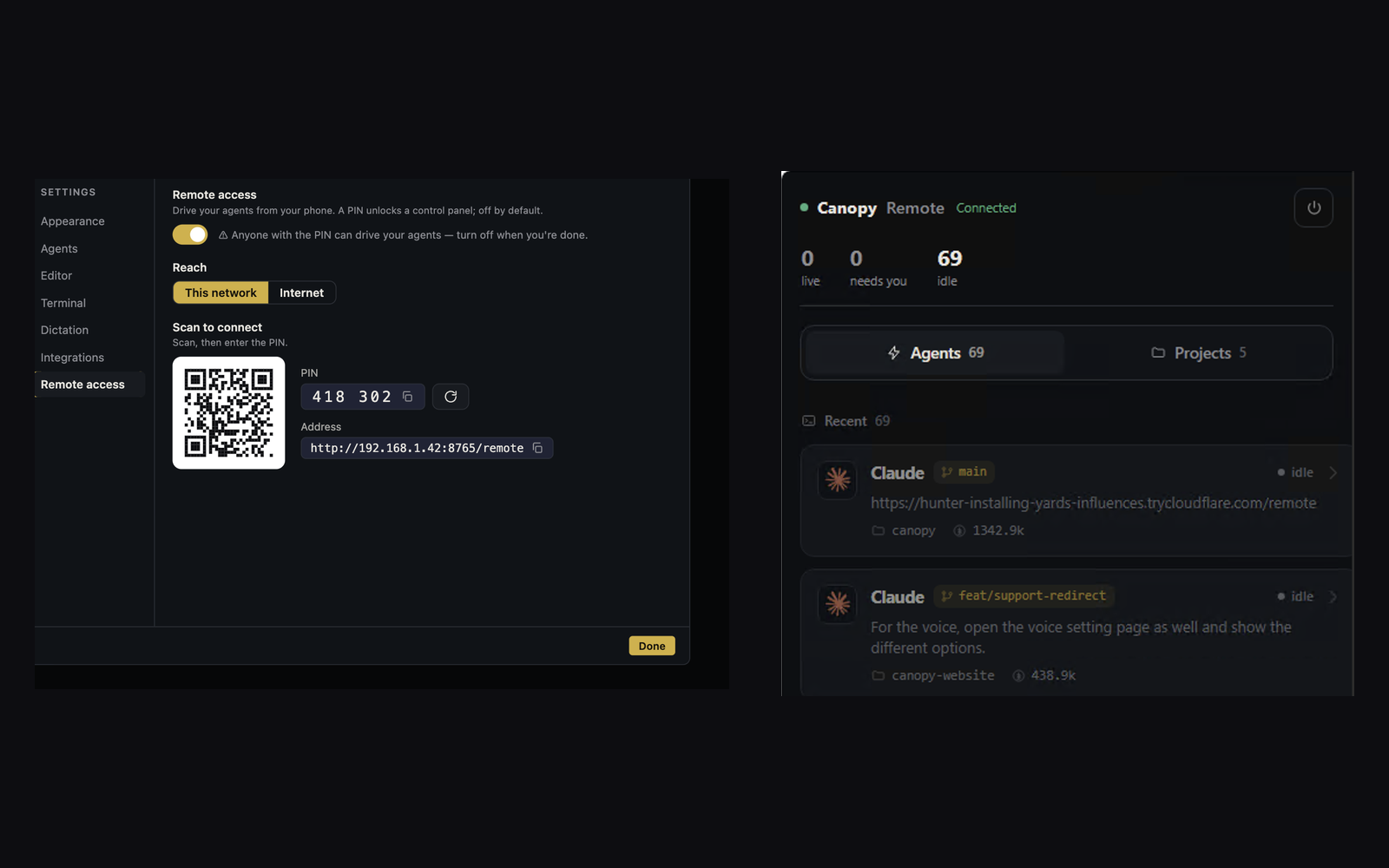
Canopy Remote is off by default. It serves a PIN-protected browser interface from the running host, over your local network or a Cloudflare, ngrok or Tailscale tunnel. Keep the host awake. Anyone with the endpoint and PIN can drive permitted surfaces, including agent terminals, so treat the PIN as a credential. Remote is separate from any CLI's own remote control.
Read the live task before you prompt
Match the project, branch, agent and last prompt to your note. Remote streams the same terminal process, with bounded scrollback, and starts no second process. Check current output and whether the agent needs you. If a service failed, read its output before asking for a rewrite. If the agent says it's done, check the files, PR and checks.
After a disconnect, re-establish the facts
Check that the host app is still running and reachable. A dropped phone connection says nothing about whether the CLI kept going, waited or stopped. Reopen Remote, sign in if needed, find the same session, and compare output and files with what you saw before.
If an instruction may already have reached the CLI, don't resend it until you know the outcome. If the host app exited, its processes were cleaned up: reopen the project, check files and services, then use the CLI's resume path.
Choose attach, resume or a fresh handoff
Attach when the original terminal is live and the task unchanged. Resume through the CLI if the process ended but the conversation survives; support varies by CLI. Otherwise start fresh with a short handoff. A restored conversation doesn't mean the process ran while the laptop was off. Merge or deploy only where you can read the final diff properly.
Close the access window when you're done
Save the branch, result, open question and next owner. Stop or rotate the PIN, close any tunnel, and check the desktop agents and servers. Closing the phone tab only ends your view. To stop work, use the CLI or host controls and confirm the process ended.
Copyable resources
Keep task identifiers here, not secrets.
Before leaving: project [ ]; component [ ]; branch/worktree [ ]; CLI/session [ ]; last prompt [ ]; expected stop point [ ].
After reconnect: host reachable [ ]; same session [ ]; latest terminal state [ ]; changed files/PR [ ]; services and URLs [ ].
Instruction delivered before disconnect? [yes/no/unknown]. If unknown, check before resending.
Next action: attach [ ], resume [ ], or fresh handoff [ ].
Afterward: checkpoint saved [ ]; Remote PIN stopped/rotated [ ]; tunnel stopped [ ]; host processes checked [ ].
Frequently asked questions
Does Canopy Remote work when my computer is off?
No. Remote controls Canopy on your running computer. For agents that keep running with your computer off, use a cloud workspace (preview), a managed Linux machine that runs agents, terminals and servers.
Is Remote enabled automatically?
No. It is off by default and uses a PIN when enabled.
Did my coding agent stop when the phone lost connection?
A phone disconnect alone doesn't tell you. Reconnect to the running host and check the same terminal, branch and latest result before retrying or resuming.
Does closing the phone tab stop the agent?
No. Stop the CLI or host process through its own controls and confirm it ended; resuming a CLI conversation later is separate.