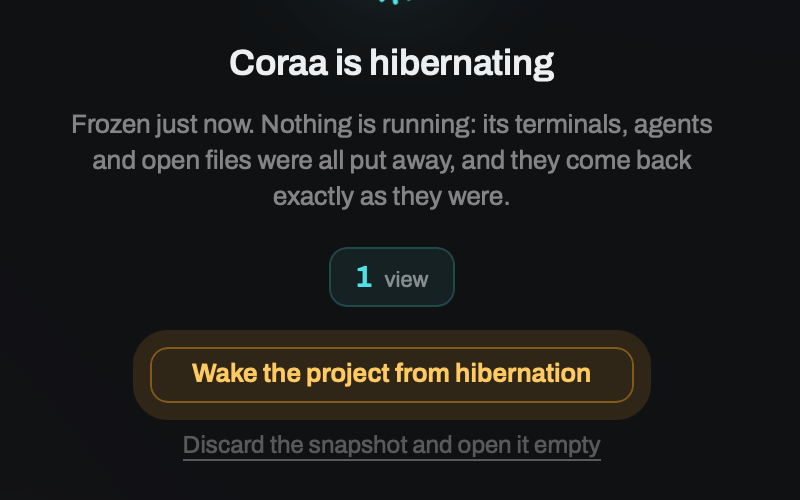
‘Resume later’ can mean reopening a hidden project, restoring a saved workspace, or asking the CLI to resume a conversation. Those actions do not promise that the same process kept running the entire time.
First, name what you are closing
Switching to another open project is different from hibernating a project or exiting Canopy. Closing a window can also differ from exiting the application by platform and app behavior, so check whether Canopy is still running. The current-main architecture documentation says open, awake projects remain mounted while hidden, so their PTYs and editor models survive a project switch. Hibernation explicitly snapshots and unmounts a project for resource release, then reconstructs it later. App exit is a separate cleanup boundary for owned processes and services. Confirm the exact behavior in your installed release before leaving important work unattended.
If you closed an agent tab by mistake
The published v0.3.4 notes include a restore window when closing agent tabs. If you accidentally close one, inspect that restore option immediately in your installed build, then verify the restored session's project, branch, process state, and latest files. A tab recovery affordance should not be interpreted as proof that a stopped CLI process continued running. Save the branch and next action even when the UI can restore a tab.
Save an inspectable checkpoint
Before a long break, record the current branch and working-tree status, open PR, last accepted decision, tests run, and next action. If the agent is editing, let it reach a stable point or stop it deliberately. A retained tab or restored conversation can show useful context, but the repository and running services are the evidence of what actually completed. Do not equate a saved terminal title with a still-running task.
Check whether the CLI can resume the conversation
Canopy's August 2026 agent parity audit lists resume commands for several supported CLIs and notes differences in their session integrations; Aider has no per-session resume in that audit. The CLI stores and restores its own conversation according to its implementation. Canopy can surface session digests and launch a supported resume flow, but it does not transfer one provider's private conversation into another CLI. Check the installed CLI version and the available resume action before relying on it.
Reopen the project and test reality
When you return, check branch and uncommitted files first. Look at the current agent state, not only its old transcript. Restart required website, API, or worker commands from the Servers panel if they are no longer running, then open the detected URL and verify the current checkout. If the previous CLI session is still the right task, resume it with a short state update; otherwise start a fresh session from the checkpoint. Canopy Remote also requires a running desktop host, so a closed host is not an always-on agent server.
Use a small lifecycle experiment
On a disposable task, start an agent and a local service, note the process state and branch, switch to another project, then inspect the first project. Separately test hibernation and app exit in your installed version, recording what remains in the workspace and which processes must be restarted. Do not test with unsaved edits or a production deployment. This separates current-release behavior from assumptions based on a screenshot or documentation for main.
Copyable resources
Before leaving a project
A short record makes a resumed session useful even if the process stopped.
Project and component: [ ]
Branch and git status: [ ]
Agent CLI and session: [ ]
Last accepted result: [ ]
Open PR or issue: [ ]
Services currently running and URLs: [ ]
Checks run with results: [ ]
Next action: [ ]
On return: verify current branch, process state, service URL, then resume or start fresh.
Frequently asked questions
Does switching to another Canopy project stop my agent?
The current-main architecture says awake projects stay mounted while hidden, preserving their PTYs. Verify the status in your installed release and distinguish a project switch from hibernation or app exit.
Will an agent keep running after I close the window or exit the desktop app?
Check whether the app itself is still running after a window closes. Canopy's architecture treats app exit as a process-cleanup boundary. Save a checkpoint and verify process state when you reopen the project.
Is restoring a CLI conversation the same as restoring a live process?
No. A CLI may reopen recorded conversation context after a process has ended. Check the branch, files, and services before continuing.
Can I recover a Canopy agent tab I just closed?
The v0.3.4 release notes describe a restore window for closed agent tabs. Check it immediately in that release, then confirm whether the CLI process is running and which branch it uses.