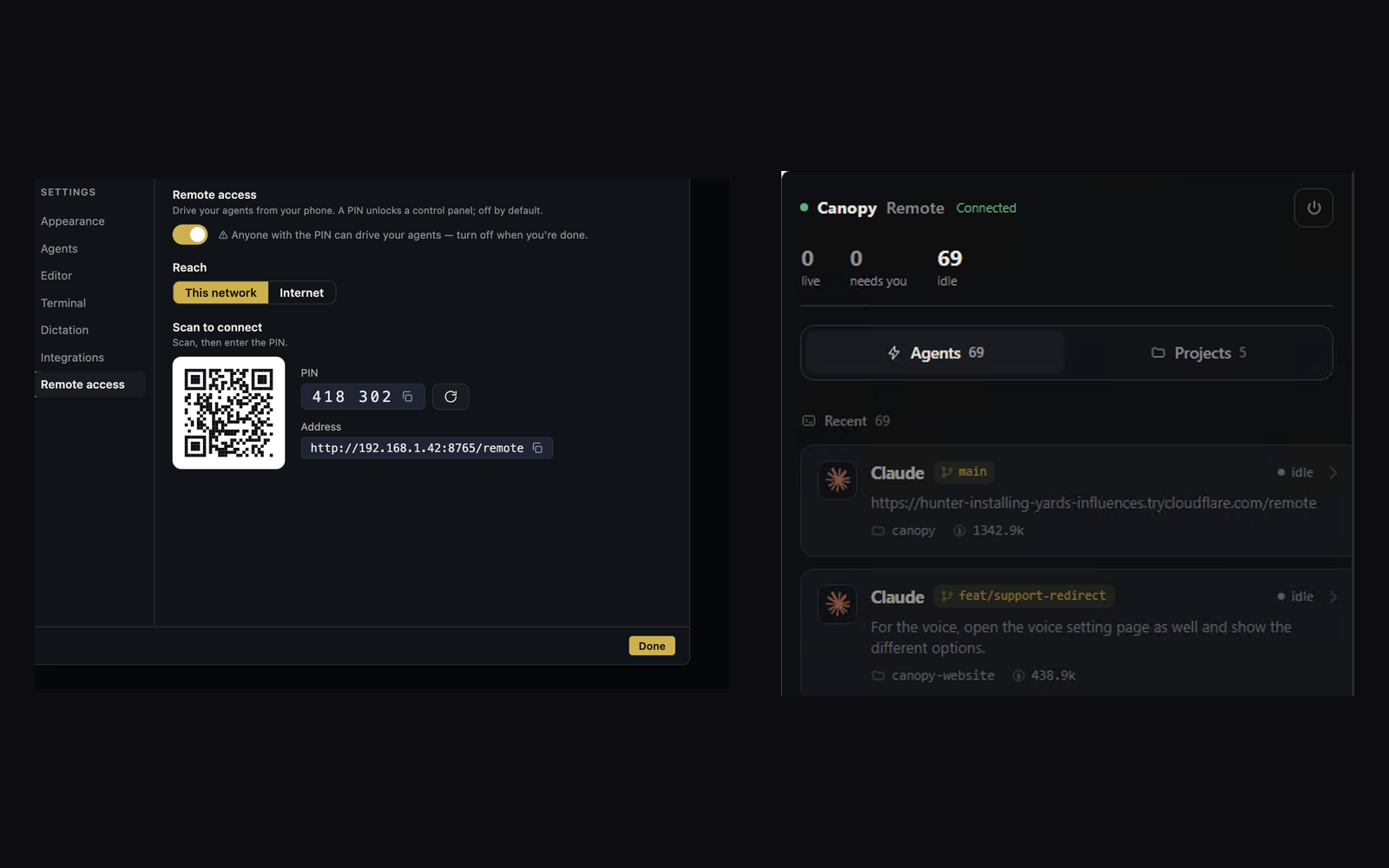
A phone can steer a local coding agent through the CLI provider's own remote feature, Canopy Remote, or an SSH terminal. These routes can all keep execution on your computer, but they expose different evidence and trust boundaries. The useful question is whether you need one provider's conversation, several installed CLIs plus the running project, or an unrestricted shell. Test the exact host, session, branch, and final change before choosing from a feature list.
Start with the host and the task
Suppose a coding agent is repairing a checkout form while you leave your desk. The project also has a local API, a worker, a branch with a draft PR, and a second agent reviewing the change. First ask which process must stay alive: a Claude Code or Copilot CLI session, the Canopy desktop host, or an SSH-accessible machine and tmux session. A sleeping or powered-off host does not keep local execution going merely because a phone UI remains open. A lost phone connection also does not prove the host process stopped. Before sending another instruction, reconnect and inspect the same session, last prompt, checkout, and output.
| Route | Phone view and control | Account or access boundary | Host requirement |
|---|---|---|---|
| Claude Code Remote Control | Claude conversation, subagents, local Git diff, model and effort controls in supported versions | Eligible claude.ai login and organization settings; transcript stored by Anthropic while connected | Local `claude` process and machine must keep running |
| GitHub Copilot CLI Remote | Copilot session, prompts, approvals, mode changes, and cancel from GitHub web/mobile | Same signed-in GitHub account; organization policy can govern availability; session events sent to GitHub | Interactive Copilot CLI session on an online machine |
| Canopy Remote | Project terminals across installed CLIs, agent and service state, files, changes, PRs, and usage | PIN-protected Canopy host over LAN or optional tunnel; anyone with reachable endpoint and PIN can use permitted controls | Canopy desktop host remains running |
| SSH with tmux | Remote shell and attached terminal sessions; other project evidence needs your own commands/tools | SSH identity, host/network access, and terminal permissions you configure | SSH host and tmux server remain running |
Use the native CLI route when its conversation is the job
Claude Code Remote Control connects the Claude app or claude.ai/code to a local Claude process. Its docs now describe synchronized conversation, subagents, Git diff, model choice, and server mode with multiple sessions; it is not merely an approval button. The server can spawn sessions in one directory or separate worktrees, so verify its configured mode before assuming isolation. It requires an eligible claude.ai plan and login, not an API key, and some enterprise endpoints and policies disable it. Claude says local execution and filesystem access stay on the host, while the connected transcript is stored on Anthropic servers. If your whole task is inside Claude Code and its own mobile view shows the evidence you need, start there. It does not create a shared remote workspace for unrelated installed CLIs or your saved local server commands.
- Use `/remote-control` inside an existing Claude session or the documented CLI mode, then verify the named session on the phone.
- Check whether the session is interactive or server mode, which worktree it uses, and whether the host process is still running after a disconnect.
- Treat a remote Git diff as a review aid; compare it to the actual PR head and checks before merging.
Use Copilot CLI's remote surface for its own session
GitHub documents remote control for an interactive Copilot CLI session through GitHub.com or GitHub Mobile. It can answer questions, approve or deny permission requests and plans, send prompts, switch modes, and end the current operation; slash commands are not currently available there. GitHub says the same signed-in account alone can remotely control the session. Session messages, tool events, and permission requests go to GitHub, while shell commands and file operations still run locally. For organization or enterprise seats, the relevant policy must permit view and control; a GitHub-hosted repository is not required for the session itself. This is a good fit when the one Copilot CLI conversation is the work you need to steer. If a worker failed or another CLI owns the change, inspect those with the project tools that actually expose them.
- Confirm the session is interactive and the machine is online; scripted `--prompt` sessions are excluded in the current docs.
- After reconnecting, find the same session and compare the remote event with local Git and PR evidence.
- Do not assume a Copilot remote permission approval means the app's success and failure paths were tested.
Use Canopy Remote when the project has several moving parts
Canopy's current-main README describes an optional PIN-protected Remote browser surface for terminals, launching or resuming supported agents, files, changes, PRs, research, servers, instructions, tools, and usage. It can serve a LAN connection or a tunnel through a provider you choose. That makes sense when you need to see which of several installed CLI agents is waiting, whether the website/API/worker is running, and what branch or PR changed. Each CLI still owns its account, model, and native conversation; Canopy does not turn one provider subscription into team access. Remote is off by default, and anyone who can reach the endpoint and has the current PIN can drive its permitted surface. Verify the installed Canopy release because the main README can be ahead of the installer, and close or rotate the access window when finished.
- Before leaving, record the project, checkout, intended CLI session, local service, and expected stop point.
- On the phone, inspect terminal state, service logs, changed files, and PR before sending a second instruction.
- If the host app exits, check its process cleanup and use the CLI's own resume path; a closed phone tab is only the end of a view.
Use SSH and tmux when you need the shell itself
SSH gives an encrypted login to a reachable host; tmux lets terminal sessions survive a client disconnect while its server remains on that host. This route can be the most flexible for someone who already manages network access, terminal authentication, and shell commands. It also asks the operator to assemble the project view: which worktree, server URL, PR, model account, and test result belong to the task. An SSH connection alone is not a persistent agent process; place the agent inside a durable terminal session if you need detach and reattach, and verify its state after reconnecting. Avoid opening a general shell or broad network path when the narrower provider or Canopy surface supplies all the actions you need.
- Name the tmux session and record its project directory and branch.
- Check `git status --short --branch` and the process output after reattaching; a tmux pane can outlive the task it once showed.
- Use the host's normal access controls and network setup; a phone terminal is not the same as Canopy's project UI.
Run one phone trial before relying on it
On a disposable project, assign one small feature with a valid and failure check. Start the agent and app services from the desk, record the host, session, branch, and last prompt, then leave the local screen alone. From the phone, find the same task, answer one low-risk question, inspect a changed file or Git diff, and identify the running app and PR. Briefly disconnect the phone without stopping the host, reconnect, and check whether the earlier instruction was delivered before sending anything again. Finally, verify the accepted behavior, latest diff, tests, and PR state at the desktop. Record which facts the phone route could show directly and which required another tool. Choose the narrowest route that still lets you make a correct decision for your normal task.
| Checkpoint | Evidence to save |
|---|---|
| Identity | Host, project, CLI, session, checkout, branch |
| Continuity | Last event before disconnect, first event after reconnect |
| Result | Running valid/error behavior, latest diff, test output |
| Review | PR head, comments, checks, decision owner |
| Access | How Remote or SSH was enabled and stopped |
Copyable resources
Copyable phone-control trial card
Keep PINs, tokens, SSH keys, and private transcripts out of a shared card.
Route and installed version: [Claude / Copilot / Canopy / SSH+tmux]
Host online and process running: [ ]
Project, branch/worktree, CLI, session ID: [ ]
Last prompt and expected stop point: [ ]
Phone can see: conversation [ ]; diff [ ]; services [ ]; PR [ ]
One question/approval answered and result observed: [ ]
After phone disconnect: same host/session [ ]; delivered instruction [ ]; current process [ ]
Valid and failure behavior, tests, final diff, PR head/checks: [ ]
Access disabled or credential rotated, host state checked: [ ]
Missing evidence and next owner: [ ]
Frequently asked questions
Does Claude Code Remote Control need Canopy Remote?
No. Claude's own Remote Control connects its local Claude Code session to Claude web or mobile. Canopy Remote is a separate optional project surface that can include other installed CLIs and local services.
Can Claude Code Remote Control handle multiple sessions?
Yes. Current Claude docs describe server mode with concurrent sessions and a worktree spawn option. Confirm the installed CLI version and the directory mode before editing in parallel.
Can Copilot CLI be steered from GitHub Mobile while code runs locally?
Yes, for an eligible interactive session on an online host. GitHub account and organization policy determine access; tool and file operations remain on the local machine.
Does any phone route keep the agent working while the host is off?
No for these local-host routes. The host and relevant process must run. Cloud agent sessions are a different execution location and should be evaluated separately.
Which route works across Claude Code and Codex sessions in one project?
Canopy Remote presents supported installed CLI terminals and project surfaces together. SSH can reach any installed CLI you operate in the host shell. Native Claude and Copilot remote features steer their respective CLI sessions.
Sources and further reading
- Claude Code Remote Control: modes, worktrees, account requirements, data flow, and limits ↗
- GitHub Copilot CLI remote control, policy, and local execution ↗
- Canopy README: Remote surfaces and access boundaries ↗
- Canopy architecture: Remote host and PTY boundary ↗
- OpenSSH remote login manual ↗
- tmux project wiki ↗
- Public question comparing SSH and Claude Code Remote Control ↗