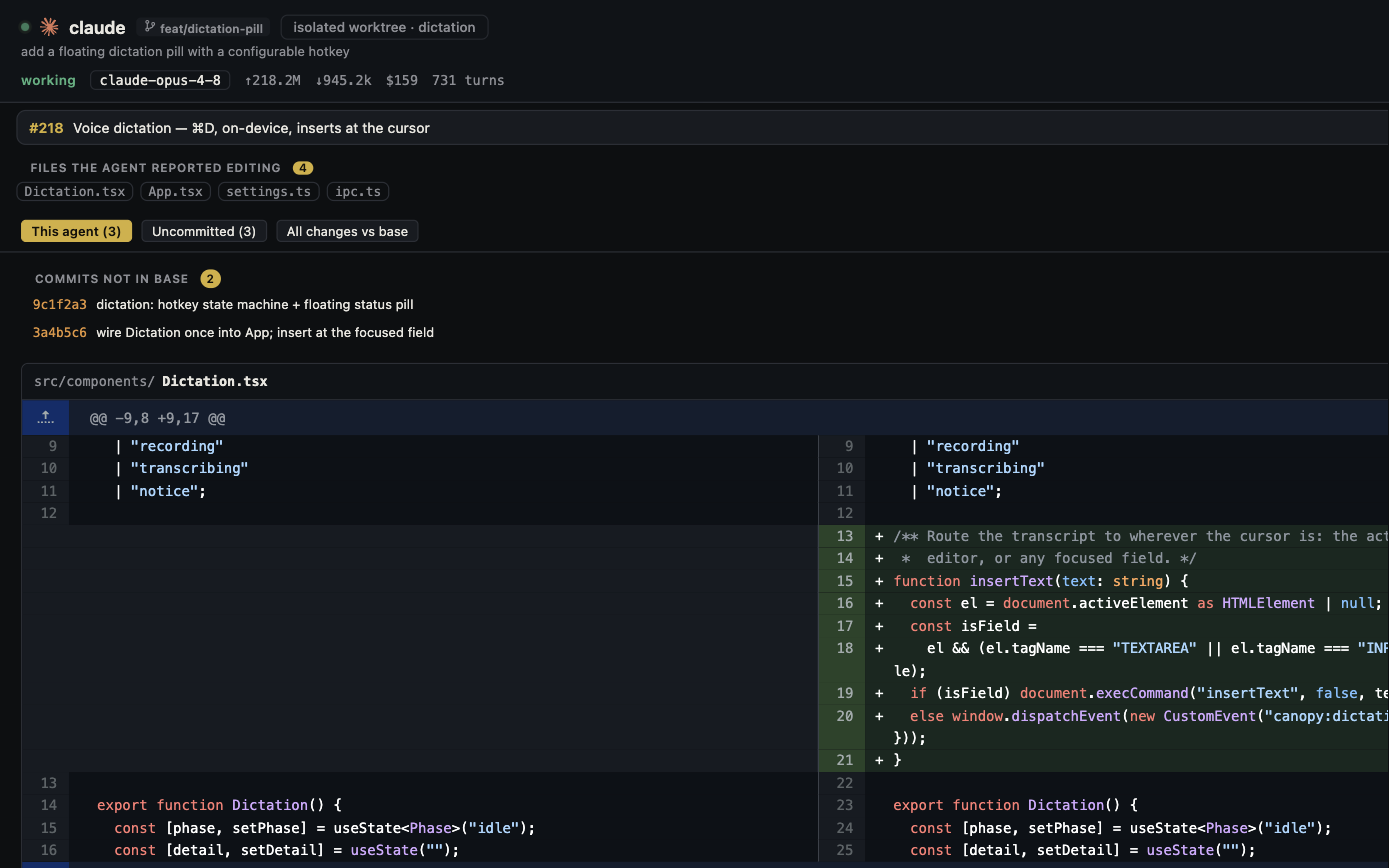
GitHub Copilot CLI is a full coding agent, not just a command suggestion tool. Its current docs cover multiple live sessions, saved history, model choice, custom agents, worktrees, review, voice, and optional remote control. Canopy is a desktop workspace for several installed agent CLIs and the project around them: local services, Preview, diffs, tasks, tickets, and PRs. Compare how one real task moves from prompt to accepted change.
Credit what Copilot CLI already does
GitHub's docs, checked on 28 September 2026, describe a sidebar for active and saved sessions, `/resume`, `/worktree`, built-in and custom agents, model selection, MCP servers, `/review`, and optional remote control through GitHub.com or GitHub Mobile. Its command reference also lists `/voice`. Copilot CLI can use GitHub-hosted models and documents a bring-your-own-provider path for compatible endpoints. Canopy should not claim that parallel agents, worktrees, model variety, review, or phone steering are exclusive to its interface.
| Decision | GitHub Copilot CLI | Canopy |
|---|---|---|
| Agent and model path | One Copilot CLI harness with selectable models, custom agents, and provider options | Several supported installed CLI harnesses; each chooses its own model and account |
| Parallel work | Active sessions sidebar, saved sessions, and worktree commands | Agent rail, sessions, split panes, and isolated worktrees |
| Review | Read-only `/review` command and GitHub PR surfaces | Agent Workspace, diff and PR context, staged review findings |
| Phone control | Optional remote control of an online running interactive Copilot CLI session | Optional PIN-protected Remote to an online running Canopy host |
| Voice | Copilot CLI `/voice` mode | On-device dictation into supported inputs; not a conversational voice agent |
| Running app | Shell commands in the CLI; inspect how you run and view the app | Saved project component commands, Servers, detected ports, and Preview |
Where Copilot CLI may fit better
Choose Copilot CLI when you want its terminal-centered workflow, GitHub integration, model picker, built-in specialist agents, `/review`, or GitHub Mobile remote interface. It can resume local sessions and delegate separate work to Copilot cloud agent. The current Copilot app is another GitHub surface built on Copilot CLI; it has its own session and review UI, so a desktop-app comparison needs a separate trial. Copilot's account, model access, credit allowance, and organization policies affect the available workflow; read current plan documentation before drawing a cost conclusion.
Where Canopy may fit better
Try Canopy when you switch among separate installed CLI harnesses and need their work next to the running website, API, worker, browser Preview, Git changes, tickets, and PR review. Canopy's current-main README documents that broader local project view and no required Canopy account. The installed CLI still owns its provider account, model, network use, and billing. Copilot CLI is not listed in Canopy's dated first-class agent parity audit; opening a shell and running `copilot` should not be presented as full Copilot integration. Check the installed build and the specific CLI signals you need.
Do not confuse the two remote paths
GitHub says Copilot CLI remote control requires an online machine with an active interactive session; organization seats may also need policy enablement. Its remote interface runs through GitHub.com or GitHub Mobile while commands remain on the local machine. Canopy Remote is enabled by the owner, uses a current PIN, and reaches the running desktop host over LAN or an optional chosen tunnel. Neither local remote-control path makes a sleeping host an always-on server. Copilot cloud-agent delegation is a separate hosted mode, not the same as its local remote control.
Run a fair project trial
Use one repository and the same bounded task: change a UI state, start the website and API, observe the page, get a review finding, and inspect the final diff. In Copilot CLI, record the plan, model, worktree, active session, review result, and how you viewed the running page. In Canopy, record the installed release, agent CLI and account, component commands, Preview, branch, and PR state. If phone access matters, test it separately with the host running. Compare accepted behavior, review time, retries, and provider-reported usage; neither a screenshot nor a first response proves a winner.
Copyable resources
Copilot CLI and Canopy comparison card
Use the same repository state, task, and acceptance checks.
Repository and starting commit: [ ]
Task and observable acceptance checks: [ ]
Copilot CLI version, plan, model, and mode: [ ]
Canopy release, installed agent CLI, model/account: [ ]
Worktree and branch for each attempt: [ ]
Local website/API/worker commands and running URL: [ ]
Review finding and final diff inspected: [ ]
Remote or voice trial, if relevant: [ ]
Retries, human review time, usage source: [ ]
Which workflow produced the clearer accepted result, and why: [ ]
Frequently asked questions
Can Copilot CLI run parallel sessions in worktrees?
Yes. GitHub documents multiple live sessions and `/worktree` or `--worktree` options for isolated Git work.
Does Copilot CLI let me choose models?
Yes. GitHub documents a model picker and a compatible own-provider option, subject to plan and configuration rules.
Can Copilot CLI be reached from a phone?
Yes, with optional remote control through GitHub.com or GitHub Mobile while an interactive CLI session runs on an online host. Organization policy may apply.
Does Canopy offer first-class Copilot CLI integration?
The dated Canopy agent parity audit does not list Copilot CLI as a first-class adapter. You can evaluate it as a shell program, but verify the exact behavior and do not assume Canopy can attribute or resume it like a listed supported agent.
Sources and further reading
- GitHub Copilot CLI overview and provider options ↗
- GitHub Copilot CLI sessions and resume ↗
- GitHub Copilot CLI command reference: models, worktrees, review, voice ↗
- GitHub Copilot CLI code review ↗
- GitHub Copilot CLI remote-control boundary ↗
- GitHub Copilot app session workflow ↗
- GitHub Copilot plans and model access ↗
- Canopy current-main README ↗
- Canopy first-class CLI integration audit ↗