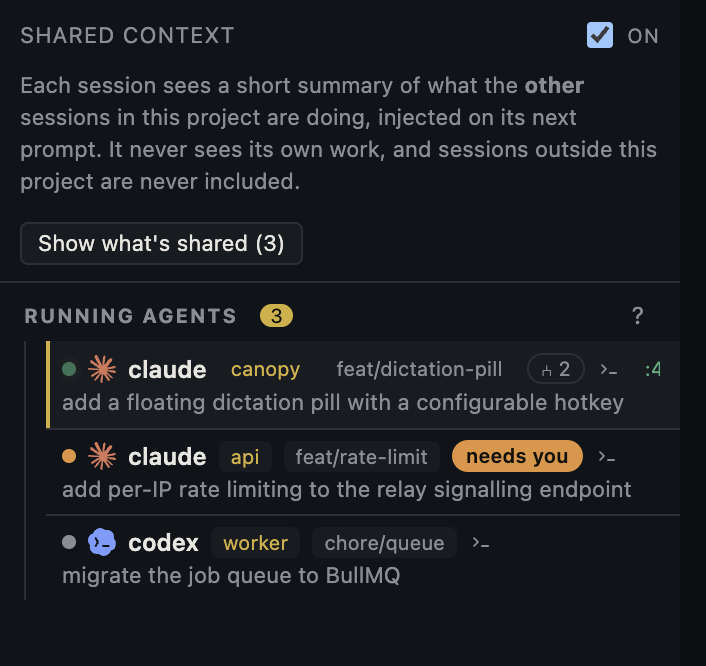
A session that has not produced new text for ten minutes is not automatically frozen. It may be waiting for an approval, running a command that never exits, watching a dev server, or sitting at the CLI's next prompt. Find the last concrete event before you send another instruction or close the tab.
Identify the exact session and last event
In Canopy, check the project, checkout, branch, CLI, last prompt, and live terminal output. Record when the output last changed. The current-main README says the Agents rail combines lifecycle, process resources, session history, and integration signals; the v0.3.4 notes mention agent status and attention routing work. A status badge is a useful pointer, but integration coverage differs by CLI and installed build. Open the terminal before deciding that the agent is blocked or working. If you are away from the desk, Canopy Remote still requires the host to be running.
Classify the last observable state
A permission or product question needs your decision in that same session. A shell command showing a ready URL may be a deliberately persistent server, so verify the website and move that command to a saved service when appropriate. A test or build with no new output may be slow or waiting on a child process; inspect the command, elapsed time, process state, and any output file before interrupting. A CLI prompt after a final answer usually means that turn completed. A process exit with an error calls for the first failure line and a focused retry. Do not interpret a flat token counter as proof of a hang: usage signals and refresh timing vary across CLIs.
| Last evidence | Check | Next action |
|---|---|---|
| Approval or question visible | Exact tool, target, and decision requested | Answer or deny in that session |
| Ready URL and server logs | Which process and port are running | Verify the page; manage it as a service |
| Tool or test has not returned | Command, elapsed time, child process, output | Observe or stop that operation deliberately |
| CLI prompt after final answer | Diff, tests, and unfinished task | Review result or give a new bounded task |
| Process exited or error printed | First error and checkout | Diagnose the failure before restarting |
Treat missing attention signals as unknown
Canopy's agent parity audit documents different hooks, notifications, and resume support across CLIs. Some integrations can report a permission request directly; others rely on terminal or process clues, and an unsupported event may not appear as a waiting badge. The audit also distinguishes planned improvements from shipped behavior. When a badge conflicts with the live terminal, trust the observed prompt and process output. A public report of an agent appearing to sit idle illustrates the wording of this question, but it does not establish one universal cause or a Canopy defect.
Interrupt only after preserving a checkpoint
Before stopping a long command or agent process, capture the command, latest output, checkout and Git status, currently running services, and the last accepted result. If the CLI has a cancel control, use its documented path and observe whether the child process also ended. Then decide whether to resume the same conversation or start a small fresh task with that checkpoint. Repeating the original broad prompt without checking the working tree can duplicate edits, launches, and usage. If the agent was genuinely waiting for an approval, the fastest fix may simply be to answer it after checking scope.
Verify forward progress
After a decision or restart, look for the next real event: tool result, changed file, test result, or a clarified question. For a code task, inspect the actual diff and running behavior. For a local server, use the printed URL and matching process output. If there is still no event, narrow the work to one observable step and preserve the error or terminal state for a bug report. A moving spinner is not an outcome; the task is back on track when it reaches a checkable next state.
Copyable resources
Stalled-session checkpoint
Capture the evidence before cancelling or repeating a task.
Project, checkout, branch, and CLI version: [ ]
Last prompt and intended outcome: [ ]
Last visible terminal event and time: [ ]
Pending question or approval, if any: [ ]
Command/process still running and its latest output: [ ]
Relevant service URL and status: [ ]
Git status and last accepted result: [ ]
Decision: answer, observe, stop one operation, resume, or start a bounded new task: [ ]
Next observable event that will prove progress: [ ]
Frequently asked questions
Does no new text mean the agent is frozen?
No. Inspect the live terminal for a pending question, active command, running server, CLI prompt, or process error before deciding.
Why is Canopy not showing a waiting badge?
Signals differ among CLI integrations and releases. Read the prompt in the live terminal and check the current parity audit rather than assuming a missing badge means work is progressing.
Should I close and reopen the tab to fix a stall?
First record the session, checkout, process, output, and Git state. Closing a tab, stopping a CLI, and resuming its conversation are different actions; choose the one that matches the observed state.