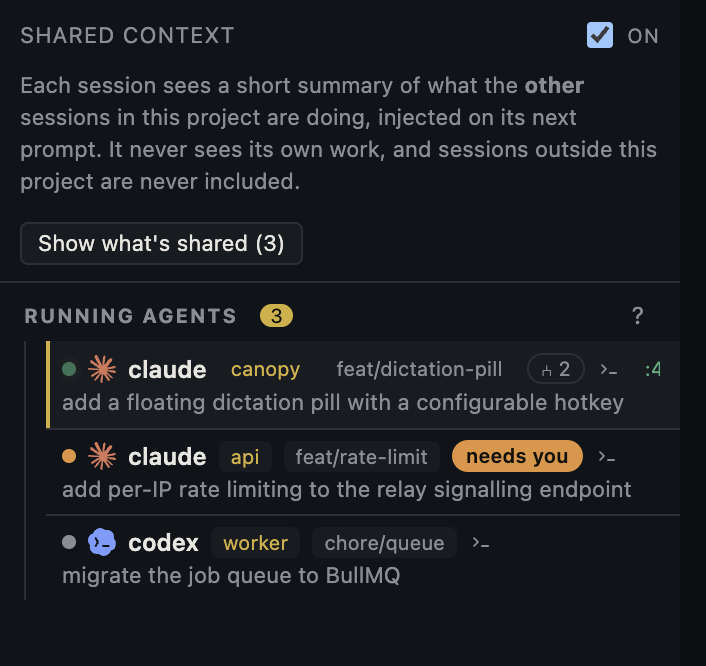
Repeated approval prompts can mean several different things: the next command is genuinely new, a rule was saved for only one session, the agent is in another checkout, or a deny or ask rule still applies. First identify the exact action and the CLI asking. Canopy can show that a session needs you, but the installed coding CLI enforces its own tool permissions.
Open the right waiting session
In Canopy's Agents rail, identify the project, checkout, branch, and last prompt before answering. Its current-main README says the rail combines terminal and CLI signals to show whether a session needs you; integration depth varies by CLI and installed release. Open the agent's actual terminal and read the requested tool, command, file path, destination, and scope. A request to read one file is not the same as a request to install a package, delete a directory, or publish a change. If the status is ambiguous, trust the live terminal over a summary badge.
Determine why this prompt appeared
For Claude Code, its current documentation distinguishes approvals that last only once, for a session, or as a saved repository rule. It also says deny rules take precedence over ask rules, which take precedence over allow rules; a natural-language instruction cannot change that enforcement. Another CLI may use different files and modes. Check the specific CLI's permission screen or documentation rather than changing Canopy settings and assuming the CLI has gained access.
| What you observe | Check first | Reasonable next action |
|---|---|---|
| Same command asks in a new session | Whether approval was one-time, session-only, or saved | Review the CLI's current rules and scope |
| Prompt appears in a second worktree | CLI version, repository root, and local settings path | Compare the two sessions' effective configuration |
| A different shell command asks | Exact command and arguments | Decide whether this new action is within the task |
| A tool is unavailable or denied | Deny/ask rule, mode, working directory, and organization policy | Use a narrower permitted route or request an authorized rule change |
| Agent asks a product question | Task brief and missing decision | Answer the decision; do not alter tool permissions |
Use the CLI's own controls for repeatable safe work
In Claude Code, `/permissions` shows rules and which settings file supplied them. Its documentation explains that a saved Bash approval may apply across the repository and its worktrees in current versions, while file edit approval may last only until the session ends. Inspect the actual rule before saving it: a broad wildcard can cover commands you did not intend. If the workflow repeatedly needs a known build or test command, grant only that specific action through the CLI's supported control if your project policy allows it. Do not paste a prompt claiming blanket approval and expect it to override a deny rule.
Keep high-impact decisions explicit
An agent can ask for permission because its next operation affects credentials, external services, production, repository history, or other people's work. Read the target and expected effect before approving it. Claude Code documents a bypass mode but recommends it only in isolated environments such as containers or VMs. The right response to excessive prompts is to understand their source and narrow repetitive approvals, not to assume every interruption is harmless. For Canopy Remote, remember that a person with the active PIN can drive permitted agent terminals; decide who should answer these prompts before opening remote control.
Record a small permission diagnosis
If prompts continue, capture the CLI name and version, permission mode, exact requested action with secrets removed, current project path, branch, whether this is a worktree, and the effective rule source. Ask the agent to explain why that one operation is needed and whether a narrower alternative exists. If the prompt relates to an MCP tool, verify that server's configuration and authorization in the owning CLI as a separate step. After changing a rule, retry one harmless, representative action and check the result in the live terminal.
Copyable resources
Copyable permission triage request
Use in the waiting agent session without granting a wider permission first.
Before I approve this action, explain:
1. The exact command or tool call and target path/service.
2. Why it is needed for the current task.
3. Its expected effect and whether it is reversible.
4. A narrower alternative, if one exists.
Do not retry a denied action by changing command shape or switching tools. Wait for my decision, then report the result.
Frequently asked questions
Does Canopy decide which agent commands are allowed?
Canopy provides the terminal and session context; each installed coding CLI enforces its own tool permissions. Canopy also has controls for its own features. Inspect the prompt in the CLI that issued it.
Why did 'always allow' not stop every prompt?
The approval may cover only one command pattern, repository, tool, or session. Another action or a higher-priority ask/deny rule can still prompt or block. Check the effective rules in your CLI.
Can I tell the agent in a prompt to stop asking permission?
A prompt can shape what the agent attempts, but it does not override CLI-enforced permission rules. Change the relevant rule or mode through the CLI's supported controls only after reviewing its scope.
Should I use a bypass mode to run several agents unattended?
Only if you understand the CLI's scope and have an appropriately isolated environment. First try specific permissions for repeatable actions and keep consequential operations reviewable.