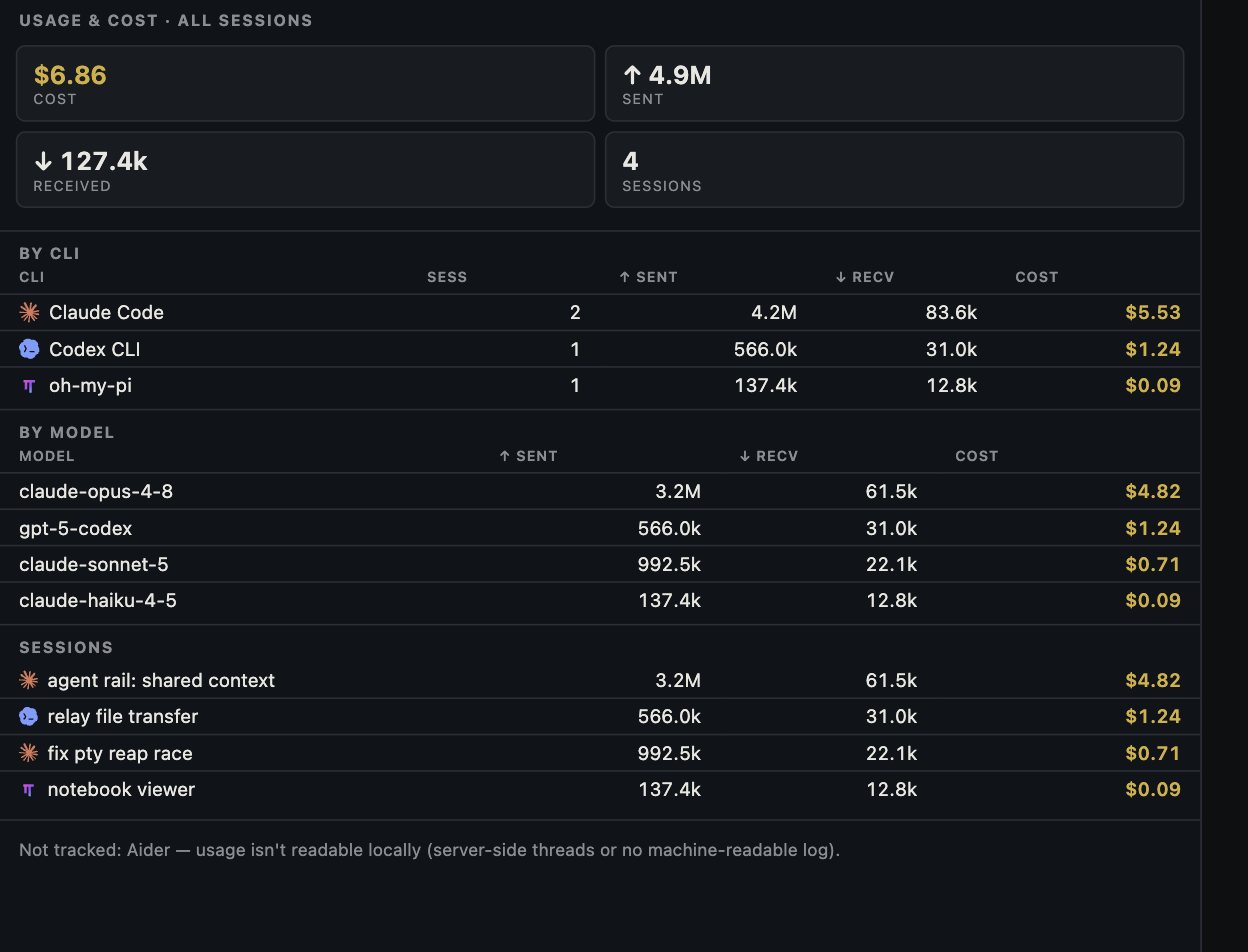
A short request can sit inside a very large model input. Coding agents often send instructions, tool definitions, earlier messages, file excerpts, and tool results on later turns. Some of that input may be read from a prompt cache. A large sent-token total is a reason to inspect the breakdown, not proof of a matching bill or a useful result.
Start with direction, window, and source
Input or sent tokens are content provided to a model for processing; output or received tokens are content it generated. Neither arrow tells you the exact price category. First identify the CLI, provider account, model, session, and selected time window. Check when the usage record was last updated. Canopy combines signals exposed by supported CLIs, and their category detail differs. Open the CLI's own usage view when available, then the provider account for limits or billed charges. Do not compare one account's seven-day plan bar with another account's API invoice.
| What you see | What to ask | What it cannot prove alone |
|---|---|---|
| Large sent or input total | Did many turns reuse a growing context? | An equal number of fresh, full-price input tokens |
| Small received or output total | Were responses short, or did tool calls dominate? | The task was efficient or correct |
| Cache-read count | How much prior input was reused? | That every request hit cache or cost nothing |
| Cache-write count | What reusable prefix was stored? | The final provider charge without current rates |
| Estimated dollars | Which categories and rates were used? | The amount charged to a subscription or API account |
Why a short prompt can produce a huge input total
A coding agent's next request may carry much more than the sentence you just typed. It can include system and project instructions, tools, previous turns, file excerpts, and command output. Anthropic's context documentation explains that earlier conversation is included in later input; its prompt-caching documentation splits the input into ordinary input, cache creation, and cache reads. OpenAI also documents reuse of a stable prompt prefix. If a 20,000-token context is present on five turns, the five request totals can approach 100,000 input tokens even when your five typed messages were short. This is an illustration, not a measured Canopy session.
- A repeated prefix may be cheaper to process when it is actually read from cache; it still appears in token accounting.
- A long tool result or broad repository search can expand the next turn's context.
- Multiple agents and retries create separate work; total usage should be compared with the final accepted outcome.
Separate fresh input, cache reads, cache writes, and output
For the Claude API, the documented total input is ordinary input plus cache-creation input plus cache-read input. OpenAI's response usage reports input and cached-input detail, with model-specific cache-write behavior. These categories can have different API rates; a single sent total cannot be multiplied by one rate to reconstruct a bill. Output is a separate category, and some reasoning-model work can count as output even when it is not visible as a long answer. Provider subscription usage is a different accounting system again.
| Category | Example tokens | Interpretation |
|---|---|---|
| Fresh input | 1,000 | New material processed in this request |
| Cache creation | 4,000 | Prefix written for possible reuse |
| Cache read | 15,000 | Previously cached prefix used again |
| Total input | 20,000 | Sum of the three input categories |
| Output | 500 | Model-generated tokens, counted separately |
Diagnose a surprising session before restarting it
Write down the session ID or task, model, start and end time, displayed total, and last update. Compare one interval rather than all-time totals. Did a command fail and get retried repeatedly? Did a file or log dump enter the conversation? Did the agent launch subagents or switch models? Did the CLI compact or restart context, changing cache reuse? Look for the same interval in the CLI or provider's own usage record. A stale or incomplete connector can disagree with a live provider view; record the mismatch instead of forcing the numbers to agree. The runaway-session guide gives a log for investigating an active spike.
- Pause an active loop if it is still doing the wrong work.
- Keep the error, branch, and acceptance checks; start a fresh bounded task only after you know what to preserve.
- For OpenCode, its CLI documents a stats command with model and project filters; for another CLI, use its own supported usage view.
Optimize the finished task, not the arrow
Reduce irrelevant file dumps, repeated failed commands, and unbounded requests. Keep project rules concise and stable; hand a new session the goal, branch, decisions, checks, and next action instead of a whole transcript when a switch is needed. Reuse context when it helps correctness and caching, but compact or reset when stale material is causing mistakes. Compare two approaches with the same acceptance criteria and count attempts, review time, rework, and final result. A lower sent-token number that produces a broken PR is not an improvement.
Copyable resources
Copyable usage investigation
Use totals from your own CLI and provider view; do not paste private prompts or account details into a public issue.
Task and accepted result: [ ]
CLI / model / account label: [ ]
Session ID and time window: [ ]
Usage observed at: [timestamp]
Input or sent: [ ]; output or received: [ ]
If available: fresh input [ ]; cache read [ ]; cache write [ ]
Provider plan limit or API billing record for that interval: [ ]
Repeated errors, tool output, retries, subagents, or model switches: [ ]
Decision: continue, narrow the task, compact, or stop and hand off
Evidence to preserve: branch/PR, exact failure, tests, decisions, next action
Frequently asked questions
Does a billion sent tokens mean I typed a billion tokens?
No. Sent or input totals can include instructions, tools, files, prior conversation, and repeated or cached context across many requests and sessions. Check the reporting scope and category breakdown.
Are cached tokens free?
Usually not in API pricing. Providers publish separate cache-read and sometimes cache-write rates. Subscription plans use their own limit rules; check the provider account for actual charges.
Why are output tokens so much lower than input tokens?
Each request can include a large project and conversation context while the model returns a short answer or tool call. The ratio alone says nothing about code quality or task completion.
Should I clear context whenever sent tokens rise?
Only after checking whether the context is useful, cached, or stale. Clearing it can lose decisions and trigger repeated research. Preserve a concise handoff and compare the accepted result.