
A usage panel can show a session's tokens, a seven-day plan limit, and a dollar estimate side by side. They measure three different things. Check the account, CLI, model, session, and observation time before using the panel to pick an agent or explain spending.
Start with the account and time window
Identify the CLI profile and provider account behind each row, then read the window and 'as of' timestamp. A weekly plan-limit percentage describes capacity in that provider's window. It isn't a price or a token allowance, and it may not be live. Anthropic separates a seat with included rolling-window usage from API-key usage charged per token; other CLIs have their own rules. Refresh an old snapshot before assuming a reset.
Narrow from CLI total to one session
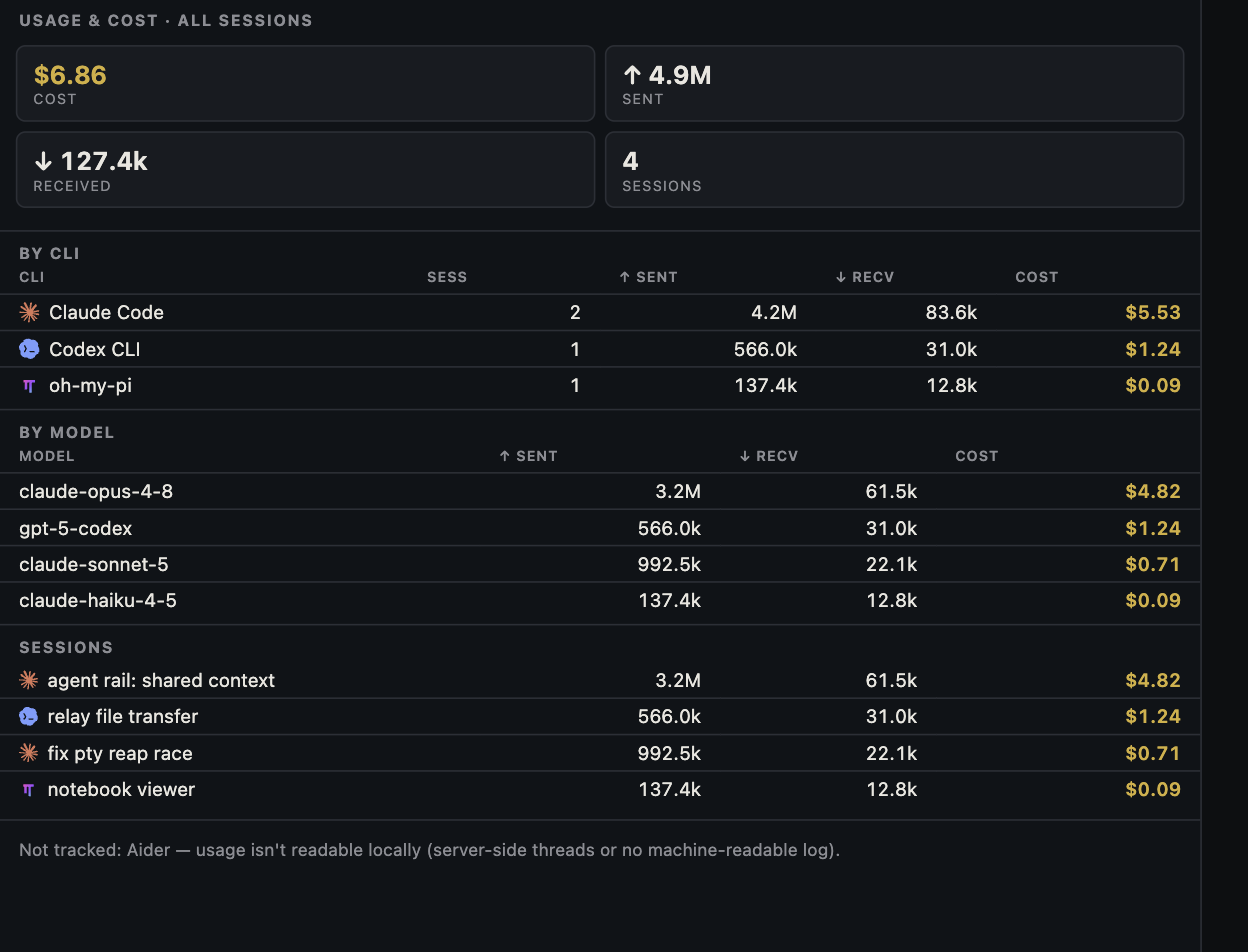
The by-CLI view shows where usage piled up, the by-model view which models handled it, and the session view ties it to one piece of work. Don't compare research with implementation as equals. For one session, record its task, model, times, tokens sent and received, and result: accepted change, useful finding, or nothing. Reporting covers selected CLIs in differing detail, so this isn't billing data.
| Signal | Useful question | What it does not prove |
|---|---|---|
| Plan limit and reset time | Can this account likely continue in this window? | Actual charge or live balance if timestamp is stale |
| Sent and received tokens | How much model traffic was reported? | Whether the answer or code was useful |
| Model breakdown | Which model handled the work? | That one model alone caused the final outcome |
| Estimated dollars | What would reported usage suggest at assumed rates? | What the provider invoiced |
| Session count | How many tracked sessions exist? | How many accepted changes were delivered |
Treat estimated dollars as a model of usage
An estimate depends on the model, input, output, cache categories, and rate sheet. OpenAI's API token prices can change and say nothing about a Codex subscription charge. Anthropic likewise separates plan usage from API-key spending. Included capacity, caching, missing CLI data, credits, and discounts can all make the bill differ. Use the provider's billing page for money and the session view for workflow.
Investigate a surprising number before switching models
When a session looks large, note the time and compare the CLI's record, Canopy's display, and the provider's usage view. Did the agent retry a failing command, carry a long context, spawn work, or switch models? A big sent-token total doesn't mean expensive output. The runaway-session guide has a triage log. Fix the task boundary or context first; a cheaper model won't fix a loop.
Compare complete outcomes
To test model choice, give two routes a similar task with the same acceptance criteria. Count attempts, diff, tests, review time, and rework alongside the estimate. A light model may handle triage and still need a stronger review; a premium model may pay off if it cuts failed attempts. Record results in the accepted-change worksheet. Don't rank models from one chart or one example.
Want to check the arithmetic? Enter your own token counts and rates in the session cost calculator →
Frequently asked questions
Is Canopy's estimated cost my actual charge?
No. Plans, included usage, caching, discounts and reporting gaps can make your bill different. Check your provider's billing page for actual charges.
Does every CLI report the same usage detail?
No. Canopy can only show the tokens, model, limits and cost data a supported CLI exposes locally.