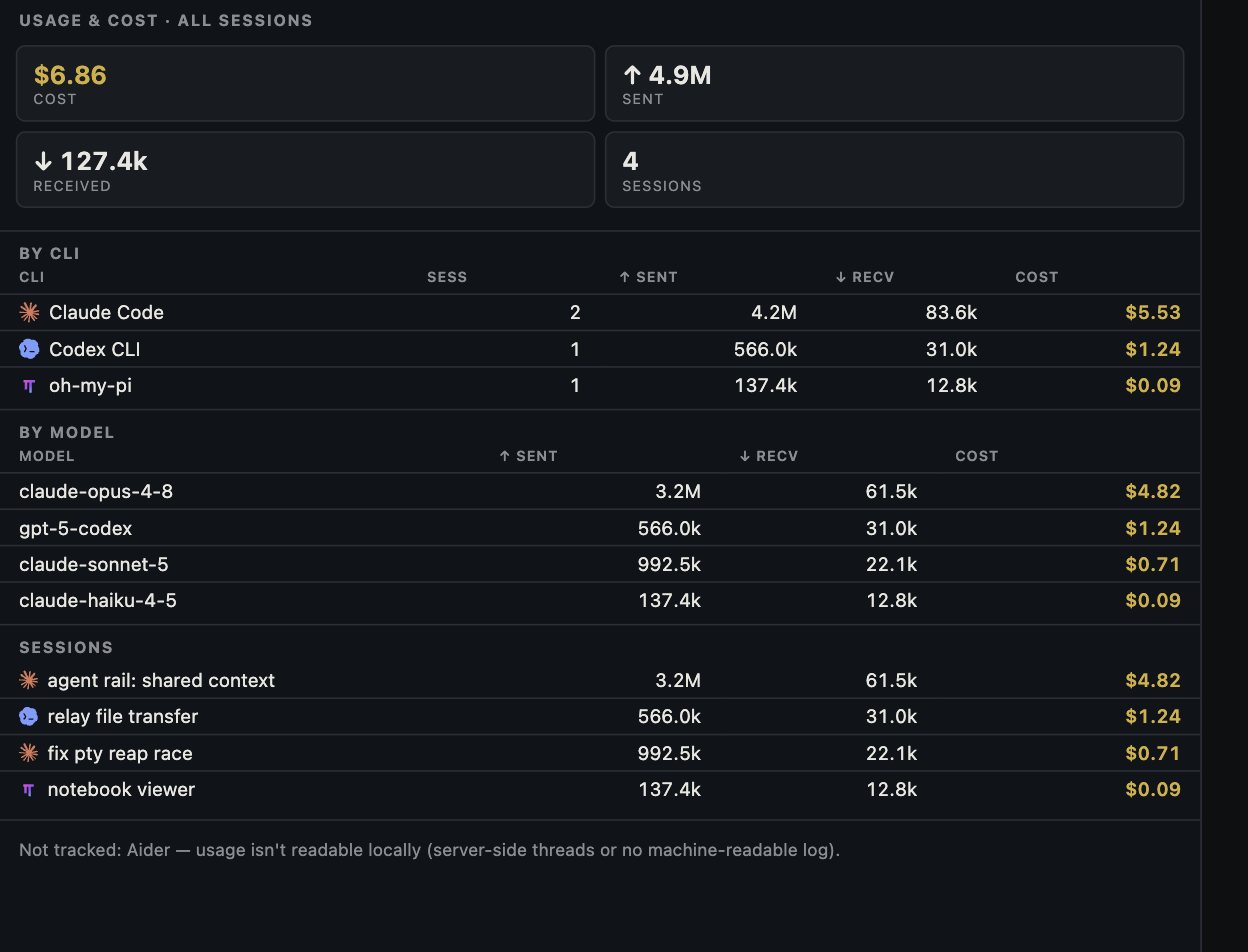
An estimated dollar figure can be useful and still be the wrong answer to 'what did I pay?' A coding-agent dashboard may put session tokens, plan-limit percentage, and an API-equivalent estimate next to one another. They are three ledgers with different owners and time windows.
Ledger one: model consumption
When a supported CLI exposes model and token data, Canopy can group it by session, CLI, and model. This is a map of work: which session was busy, which model handled it, and whether input, output, and cache categories are available. The detail differs by CLI and installed release. A total across several agents can be large because each turn carries context and some of that input is reused from cache. Counting tokens does not show whether the change worked, whether it was accepted, or how a subscription converts usage into limits.
| Record | Where to check | What it can answer |
|---|---|---|
| Session consumption | Canopy and the owning CLI | What activity was reported for this task and model? |
| Plan capacity | Provider account and timestamped limit view | Can this account likely do more work in its current window? |
| Actual charge | Provider billing or invoice | What did the provider charge under this account and agreement? |
Ledger two: plan capacity at a particular time
A seven-day usage percentage can inform the next routing choice, but read the account, window, reset time, and 'as of' timestamp. A stale snapshot may predate a reset or a burst of other sessions. It is not a universal token allowance or the price of those sessions. Subscription plans and API-key usage follow different rules, and two CLI profiles may belong to different accounts. If the next job depends on available capacity, check the owning provider's current account view rather than inferring it from a week-old bar.
Ledger three: the charge on your account
An API-equivalent estimate applies a model's published token rates to reported categories. API pricing can distinguish ordinary input, cached input, cache writes, and output; the exact rates and categories vary by model and provider. A subscription may include usage, have separate extra-usage charges, or enforce limits without an itemized per-session invoice. Credits, missing telemetry, and a different provider route can also make an estimate diverge from a charge. For money paid, use the provider's billing page or invoice. Never copy a private usage screenshot into public marketing without permission and context.
A worked example without a fake invoice
Imagine a team compares two routes for the same settings-form defect. Route A uses a smaller model for triage, then a stronger model for a fix and review. Route B uses the stronger model in one session. The dashboard may show fewer estimated dollars for A's first session, but that is not a result. Add its second session, retries, human review, and whether the final PR passed the same acceptance checks. If both routes use a fixed subscription, the incremental invoice may not mirror either API-equivalent estimate. If they use API keys, the provider's usage and billing records can help reconcile the estimate. The accepted-change worksheet keeps this comparison honest.
Use the dashboard to ask better questions
Which model investigated the failure, and which one produced the final diff? Did a reviewer find a bug? Did a session repeat the same failing command? Was a plan-limit row last updated before or after the work? Those are productive questions for a local usage view beside project history. Record the answer with the task and PR, then decide what to change next time. A displayed estimate is useful as a signal for investigation; the provider record remains the authority for charges and limits.
Copyable resources
Reconcile one task
Record only information you may share; use provider records for actual charges.
Task and accepted result: [ ]
Sessions and CLI/model/account labels: [ ]
Canopy observation time and selected window: [ ]
Input, cache, output categories available: [ ]
API-equivalent estimate and assumed rate source/date: [ ]
Provider plan-limit timestamp: [ ]
Provider billing or invoice record for the account: [ ]
Retries, review time, and rework: [ ]
Conclusion: consumption [ ]; remaining capacity [ ]; actual charge [ ]; accepted change [ ].
Frequently asked questions
Why can the displayed dollar amount differ from my provider bill?
The dashboard estimates consumption from reported usage. Subscriptions, included quotas, caching, discounts, and incomplete CLI data can change what you actually pay.
What is a better efficiency measure than tokens alone?
Compare accepted work, rework, review time, and elapsed time alongside token estimates for the same task.