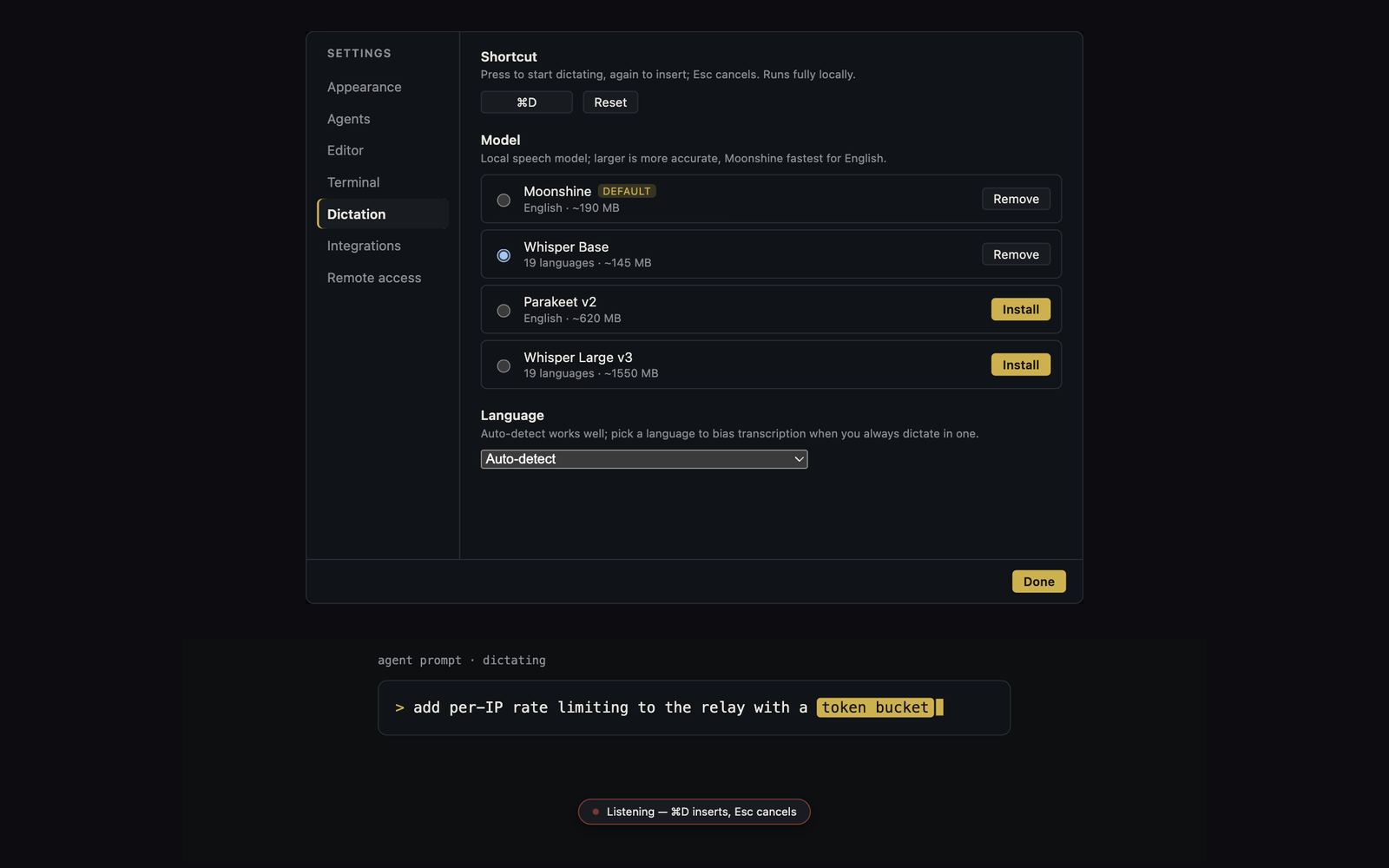
Yes, you can speak a coding request on supported systems. Canopy can transcribe speech on your device and insert editable text into an agent terminal or prompt. Some CLIs also offer their own voice input. If you mean a hands-free conversation in which the agent speaks back, check for a separate speech-output feature: Canopy's documented dictation does not provide that loop.
Open the actual product state before speaking
Run the local app and open the page in Preview. Reproduce the issue once: for example, click Save on a profile form, receive an API error, and see the button remain disabled. Record the page, viewport, input, actual result, and expected result. A screenshot or element annotation can carry the visual evidence. Dictation helps express what you see while it is fresh; it should not replace the reproduction or the run command the next person needs.
Dictate into the right surface
Canopy's current-main README documents hold-Left-Shift dictation, a configurable combo, and a double-tap gesture. It says local speech-to-text can insert text into terminals, the editor, commit messages, and agent prompts. Choose the agent prompt for a task request, the editor for a note, or the commit-message field for a description of verified work. These are text inputs. Dictation is not an autonomous conversational voice agent, and speaking into a terminal does not grant the coding CLI new permissions. Check the controls in the installed release before relying on one gesture.
Decide whether you need dictation or a spoken reply
A public voice-coding question explicitly distinguishes voice-to-text from a conversational, hands-free agent. Treat that as a useful wording signal, not evidence of how many people search for it. Canopy's documented feature covers input: speak, inspect the transcript, and send text. Claude Code currently documents its own `/voice` dictation command, and GitHub Copilot CLI documents `/voice` and a downloadable speech model. Those CLI features are separate from Canopy's input gesture; check the installed CLI version, account, microphone, and shortcut before choosing which one to use. None of these input descriptions alone guarantees audible agent replies, interruption while it talks, or spoken approval of a tool call.
| Need | What to try | What to verify |
|---|---|---|
| Speak one prompt while looking at the app | Canopy on-device dictation into the agent prompt | Transcript, focused field, installed platform support |
| Use the coding CLI's own microphone control | Claude Code or Copilot CLI voice input where available | CLI version, account, model/runtime setup, terminal shortcut |
| Hear updates and converse without reading the screen | A separate voice-output or voice-agent setup | Readback, interruption, approval path, privacy, and host lifecycle |
Edit the transcript into a task brief
Read the transcribed text before sending it. Correct names, paths, URLs, punctuation, and negations: 'do not delete the field' and 'delete the field' differ by one word with a large consequence. Then reduce an exploratory monologue to the page or file, current behavior, expected behavior, and two acceptance checks. For the profile example: after a failed request, the Save button becomes available again and the entered name remains; after a successful retry, the name persists after reload. Include the screenshot and API error if observed. Ask the agent to inspect the relevant path and report what it changed and tested.
Use speech for feedback, then verify normally
When the agent shows a result, try both the failure and success paths in the running app. If the UI is still wrong, dictate a focused correction while looking at the screen, but review the text before sending and keep it in the session as an inspectable record. Look at the latest diff, tests, and PR state. A spoken approval is not a substitute for checking changed files or asking a qualified reviewer to assess authentication, data, or deployment changes you cannot verify yourself.
Know the device and provider boundaries
Canopy's README says dictation models and transcription stay on the device on supported systems and that Intel macOS builds do not include dictation. After insertion, however, sending the text to a hosted coding CLI follows that CLI's own provider and network rules. Local transcription does not make hosted model inference local. Verify the platform and downloaded version before planning a voice-dependent workflow, and use typing when the feature is unavailable.
Copyable resources
Speak, check, send
Edit the transcription before giving the agent authority to act.
Page or service: [ ]
What I did: [ ]
What I saw: [ ]
What should happen: [ ]
Evidence: [screenshot/element/API error/log]
Acceptance 1, success path: [ ]
Acceptance 2, error path: [ ]
Boundaries: [files/behavior not to change]
Agent delivery: changed files, tests with exact results, preview path, remaining risk.
Transcript check: names [ ]; paths [ ]; negations [ ]; secrets removed [ ].
Frequently asked questions
Is Canopy voice a conversational voice agent?
No. Canopy provides on-device dictation that inserts text into prompts and other inputs. The coding CLI handles the agent conversation.
Does Canopy upload my microphone audio for transcription?
The documented dictation models and transcription run on-device on supported systems.
Does Claude Code or Copilot CLI already have voice input?
Their current official docs describe CLI voice dictation. Check your installed CLI, account requirements, and shortcut before using either inside Canopy; Canopy's own dictation is a separate input path.
Will Canopy read an agent's reply aloud?
Canopy's documented dictation inserts spoken input as text. Do not assume it includes spoken reply playback or a continuous hands-free conversation; verify any separate voice-output tool and its approval behavior.