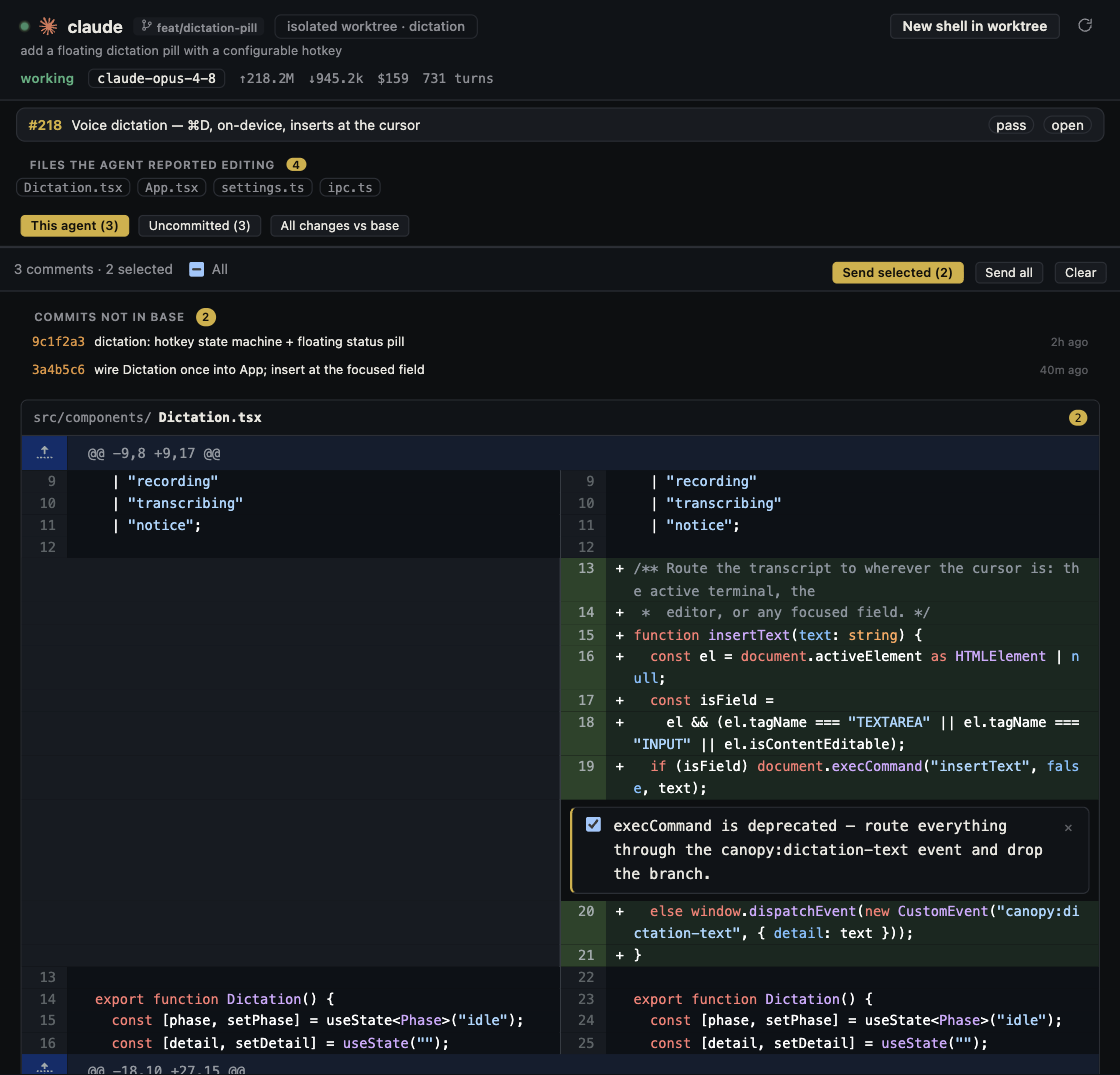
Review an agent's pull request as a proposed product change, not as a transcript of how hard it worked. Start with the requested behavior, inspect the exact diff and running result, test risky paths, and review the latest commit after feedback. A green check only reports what that repository configured it to check.
Fix the review target before reading a summary
Open the issue or task and write down the behavior you expect. Then identify the pull request's base branch, head branch, latest commit, and changed files. GitHub separates the PR conversation, commits, checks, and file diff; each answers a different question. The agent's summary may omit an unintended file or an uncommitted local edit, so compare the proposed diff with the stated scope. Canopy's current-main README says Agent Workspace joins session, checkout, files, commits, diff, branch, and PR; verify these surfaces in the installed release you are using.
Trace one behavior through the change
For a concrete example, imagine a PR that prevents double submission of a settings form. Check the button state, request handler, server response, retry path, and tests. Try one successful save and one failed request in the running app. Note the URL, checkout, and observed result; a screenshot of a disabled button alone does not prove that only one request reached the API. Use Canopy's saved service output and Preview where supported, then return to the diff to see whether the code matches the behavior you observed.
| Question | Evidence to inspect | What could still be missing |
|---|---|---|
| Does Save send one request? | Browser network entry and handler change | Keyboard or repeated-click path |
| Does failure recover? | Rejected response, visible message, retry | Loading state that never clears |
| Was the scope kept? | Full Files changed list and commit history | Unrelated configuration or generated files |
| Do checks support the claim? | Named checks and logs for the latest commit | Behavior the suite never exercises |
Use a second agent for findings, then verify them
Give a reviewer agent the PR, the intended behavior, and a read-only request for concrete defects: affected file and line, a failure path, and evidence. Treat findings as leads. Open each cited line and reproduce the concern or explain why it is not applicable before posting feedback. A review that says only 'looks good' has not checked the error path; a list of speculative risks without a way to verify them should not become public comments. GitHub's review flow lets you collect pending comments, suggest edits, and submit Comment, Approve, or Request changes as a deliberate decision.
Address comments and CI in separate rounds
For each valid comment, decide whether it needs a code change, a test, documentation, or an explanation. Send the exact thread and expected behavior to the implementing agent, then inspect its new diff and reply. If a check fails, read the failing job and first relevant error before asking for a fix; a red check may be setup, test, or product behavior. GitHub documents that later commits update the PR and rerun configured checks. Reopen the running result when a fix touches behavior, and review the latest head commit rather than relying on an approval or screenshot from before the change.
Make the merge decision explicit
At the end, confirm that the request is satisfied, critical concerns are closed, the latest checks are understood, and the reviewer has seen the final diff. If the repository uses protected branches, GitHub can require reviews and checks, but those settings differ by project. Record remaining risks and the person who accepts them. Merge only the reviewed version; if a new commit arrives after approval, repeat the affected checks and review. The related checklist is a quick pass for reviewers, while this guide is the full review sequence.
Copyable resources
Read-only reviewer request
Give the reviewer agent a link to the exact PR and task before using this prompt.
Review this pull request against its original issue and acceptance criteria. Do not edit files, post comments, approve, or merge.
For each possible defect, report: file and line, the behavior that fails, the path that reaches it, and evidence or a reproduction. Separate confirmed findings from hypotheses.
Check success, error, retry, and out-of-scope changes. Name the latest head commit you reviewed and list tests or checks you actually inspected. If evidence is missing, say what a human should test next.
Frequently asked questions
Can an AI reviewer approve an AI-generated PR for me?
An agent can propose findings, but a person should verify them against the diff and behavior and own the approval decision for the repository.
If CI is green, can I skip a live app check?
Only if the change has no behavior that needs a live check and the configured tests actually cover its risk. For a user-facing flow, inspect the running result and at least one failure path.
What if the agent pushes after I reviewed?
Identify the new head commit, inspect its diff, rerun or review relevant checks, and revisit behavior affected by the new code before merging.